![Cario logo RGB blue-1.png]](https://knowledge.cario.com.au/hs-fs/hubfs/Cario%20logo%20RGB%20blue-1.png?height=50&name=Cario%20logo%20RGB%20blue-1.png)
Purpose
Roles in Cario define what users can see, access, and perform within the Freight Management System (FMS) and Cario Connect TMS. Proper role configuration ensures users have the correct access based on their responsibilities while maintaining security, governance, and operational control.
Benefits
Using well-defined roles allows organisations to:
- Control access to sensitive configuration and pricing data
- Reduce the risk of accidental changes
- Improve operational efficiency
- Streamline user onboarding
- Maintain consistent permissions across teams
Scope
This article applies to tenant administrators and system administrators who are responsible for managing user access and permissions within Cario.
Prerequisites
Before creating or modifying roles:
- You must have Admin or Tenant Admin access
- Confirm the user’s job function and responsibilities
- Identify which modules and actions the user needs access to (e.g. Consignments, Warehouse, Customer Service, Driver Tracking)
How to Create a Role in Cario
- Log in to Cario using an Admin account
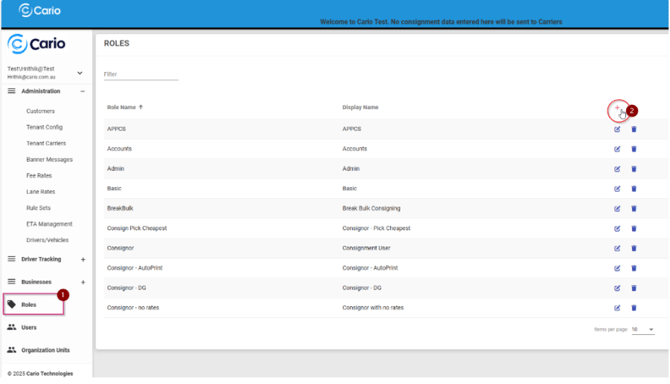
- Navigate to Administration and select Roles
- Click the plus icon to create a new role
- Enter the following details:
- Role Name
- Display Name
- Role Description
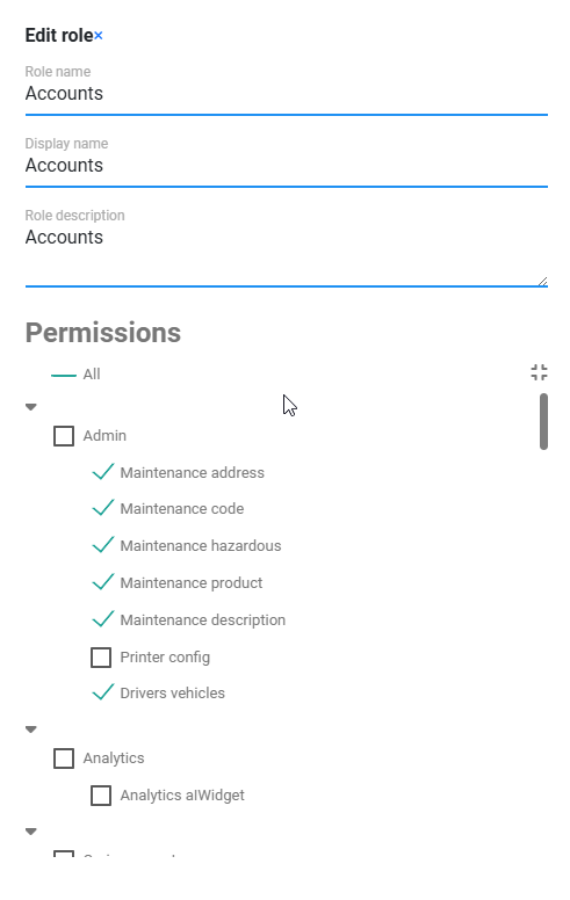
- Enable permissions based on the user’s function
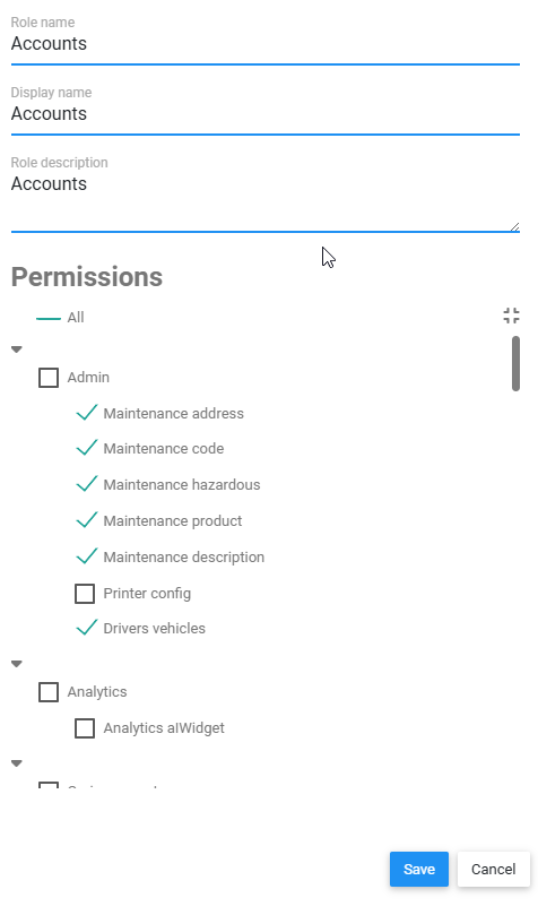
- Click Save to finalise the role
Once saved, the role becomes available for assignment to users.
Permission Categories Explained
Maintenance
Controls access to master data used across the system, including:
- Addresses
- Products
- Hazardous Materials
- Descriptions
- Codes such as Cost Centres and Custom Labels
- Printer Configuration
These permissions are usually restricted to Admin or Accounts users.
Consignments
Controls the full consignment lifecycle, including:
- Creating outbound and return consignments
- Modifying and deleting consignments
- Viewing and manifesting consignments
- Reprinting labels and manifests
- Quoting, consolidation, and autofill from orders
- Hazardous goods handling
- Status updates
Commonly assigned to Dispatch, Operations, and Customer Service teams.
Controlled Returns
Controls return workflows, including:
- Activating returns
- Receiving returned items
- Managing expired controlled returns
These permissions should only be assigned to users managing returns operations.
Warehouse
Controls order and warehouse execution, including:
- Creating orders and packed orders
- Orders maintenance
- Packing optimisation
- Event scanning and milestone updates
Assigned to Warehouse and Operations users.
Customer Service
Provides visibility and support tools, including:
- Consignment status screens
- Viewing invoices
- Reprinting and emailing documents
Typically read-only with limited modification rights.
Analytics and Reports
Controls access to:
- Dashboards and analytics widgets
- Standard and custom reports
- Report maintenance
Usually restricted to Management or Admin roles.
Tenant Features and Configuration
Advanced configuration permissions, including:
- Viewing carrier costs and charges
- Manual pricing
- Carrier allocation
- Auto print configuration
- EDI downloads
- Locking addresses
- Hiding pricing and reprint options
- Auto consignment postback
These permissions should be tightly controlled and limited to senior administrators.
Administration and Security
Controls system-level access, including:
- Roles management
- User management
- Drivers and Vehicles configuration for Cario Connect TMS
Restricted to Admin or Tenant Admin roles.
Recommended Role Presets
Tenant Administrator
Purpose: Full system administration
Typical access:
- All Maintenance modules
- All Consignment actions
- Warehouse functions
- Roles and Users management
- Tenant Features and Configuration
- Reports and Analytics
- Controlled Returns
Accounts / Finance
Purpose: Billing, reporting, and compliance
Typical access:
- Maintenance (Addresses, Products, Codes, Hazardous, Descriptions)
- View charges and costs
- Create, modify, and view consignments
- Manifest and reprint
- Customer Service invoice viewing
- Reports and exports
No access to roles or driver management.
Dispatch / Operations
Purpose: Day-to-day freight execution
Typical access:
- Create and modify consignments
- Quoting and manifesting
- Consolidation and autofill orders
- Hazardous goods handling
- Consignment status updates
- Controlled Returns (if applicable)
Limited access to maintenance and no pricing configuration.
Warehouse Operator
Purpose: Order handling and scanning
Typical access:
- Warehouse Create Order and Create Packed Order
- Orders Maintenance
- Packing Optimiser (if enabled)
- Event Scanning
- Create consignments from orders
No access to pricing, carriers, or user administration.
Customer Service
Purpose: Visibility and issue resolution
Typical access:
- Consignment Status (Basic and Advanced)
- Reprint and email documents
- View consignments and tracking
- Controlled Returns viewing or receiving if required
No access to consignment creation or pricing.
Driver Supervisor (Cario Connect TMS)
Purpose: Driver oversight and compliance
Typical access:
- Driver Assignment
- Live Map
- Driver Timeline
- Assessment Policies and Responses
- Time Approval
- Notifications
No access to consignment creation or billing.
Best Practice Guidelines
- Start from a role preset and adjust as needed
- Limit Tenant Feature permissions to Admin users
- Review roles regularly to remove unused access
- Keep Accounts, Warehouse, and Dispatch roles clearly separated