![Cario logo RGB blue-1.png]](https://knowledge.cario.com.au/hs-fs/hubfs/Cario%20logo%20RGB%20blue-1.png?height=50&name=Cario%20logo%20RGB%20blue-1.png)
In this menu option you can define hazardous materials which can be used when creating
consignments. You can select the created hazardous material in the screen ‘create a new
consignment’.
Purpose
The Hazardous Materials (Haz Mat) / Dangerous Goods module in Cario allows users to define and manage Dangerous Goods (DG) codes that can be applied to consignments.
This ensures dangerous goods are handled, declared, and transported correctly in line with regulatory requirements, carrier rules, and safety standards.
What This Helps With
Managing Hazardous Materials in Cario helps to:
- Ensure compliance with dangerous goods transport regulations
- Standardise DG information across consignments
- Reduce booking errors and carrier rejections
- Enable correct carrier selection for DG-compatible services
- Ensure accurate documentation and visibility for drivers and carriers
- Improve workplace and transport safety
What Is a Hazardous Material in Cario
A Hazardous Material in Cario is a predefined template that represents a Dangerous Good and includes:
- UN identification number
- Proper shipping and trade names
- Hazard class and division
- Packing group and subsidiary hazards (where applicable)
- Quantity and unit of measure
- Container / receptacle type
Once created, Hazardous Materials can be quickly applied when creating consignments.
Accessing Hazardous Materials Maintenance
- Log in to Cario.
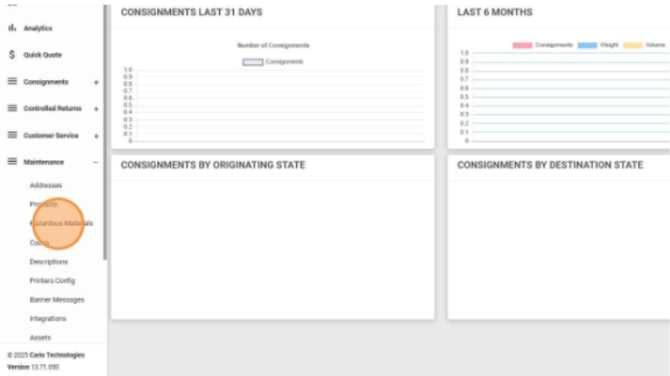
- Navigate to Maintenance → Hazardous Materials from the left-hand menu.
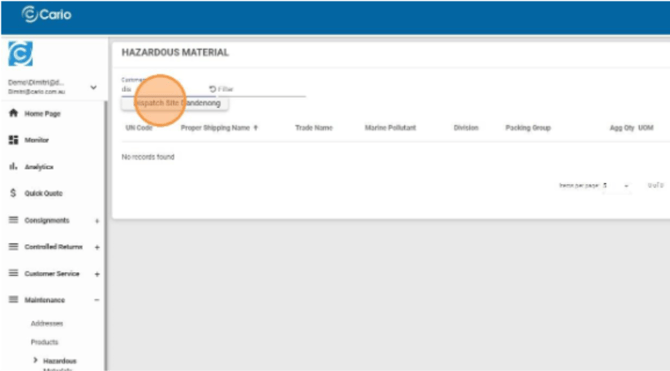
- Select the relevant Customer / Dispatch Site Account Location.
Adding a New Hazardous Material
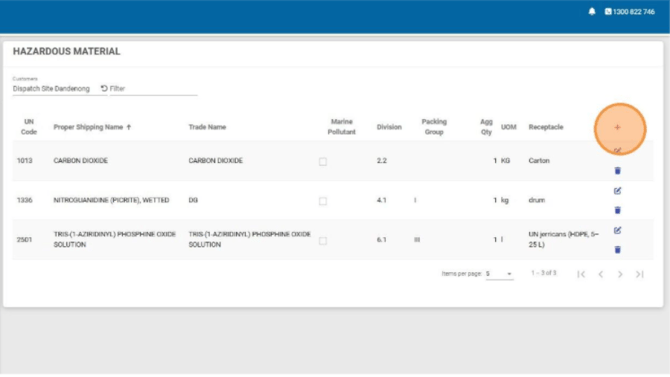
- In Maintenance → Hazardous Materials, click the red plus (+) icon.
- Enter or search for the UN Code (four-digit number) and select it.
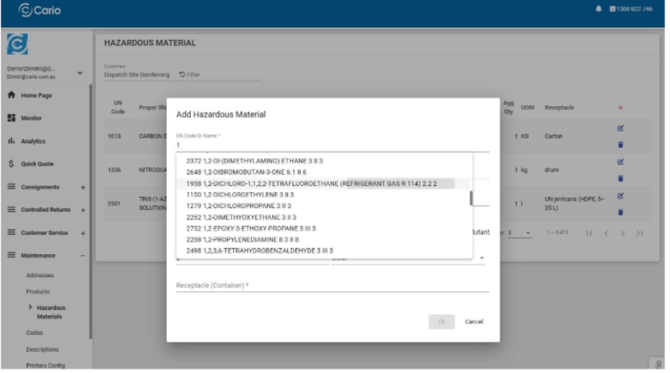
- Complete all required fields (marked with an asterisk), including:
-
Field Definitions
- UN Code or Name
The internationally recognised identification number for dangerous goods.
- Proper Shipping Name
The official transport name defined by DG regulations.
- Trade Name
The common or commercial product name (if different from the proper shipping name).
- Class
The primary hazard classification (e.g. Class 2 = Gases).
- Division
Sub-category of the hazard class (e.g. 2.2 = Non-flammable, non-toxic gas).
- Subsidiary Hazard
Any additional hazard beyond the primary class.
- Packing Group
Indicates degree of danger:
- I = High Danger
- II = Medium Danger
- III = Low Danger
(Not required for all classes) - Marine Pollutant
Identifies substances harmful to the marine environment. - Aggregated Quantity
Total quantity of DG in the consignment (kg or litres). - UOM (Unit of Measure)
Measurement unit used for the quantity. - Receptacle (Container)
The type of container holding the DG (e.g. cylinder, spray can).
ℹ️ Note:
Class, Division, Subsidiary Hazard, and Packing Group may auto-populate based on the selected UN Code.
- UN Code or Name
-
- Click OK to save the Hazardous Material.
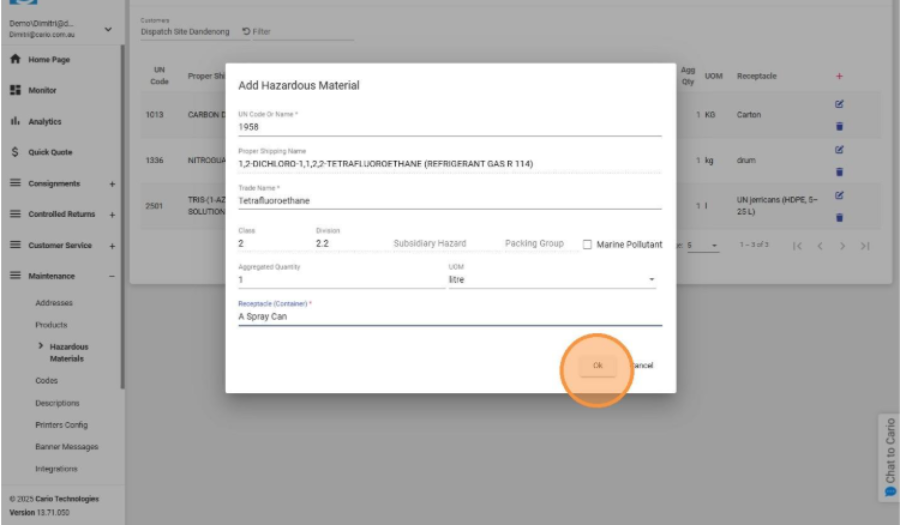
Your DG code is now saved as a reusable template.
Editing or Deleting a Hazardous Material
- Edit: Click the pencil icon next to the hazardous material to update details.
- Delete: Click the trash bin icon to remove it.
Editing or deleting a hazardous material does not affect historical consignments already created.
Using Hazardous Materials When Creating a Consignment
- Navigate to Consignments → Create New.
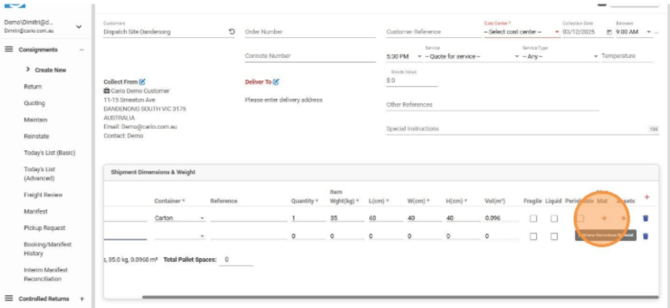
- In Shipment Dimensions & Weight, locate the Haz Mat column.
- Click the red plus (+) icon under Haz Mat.
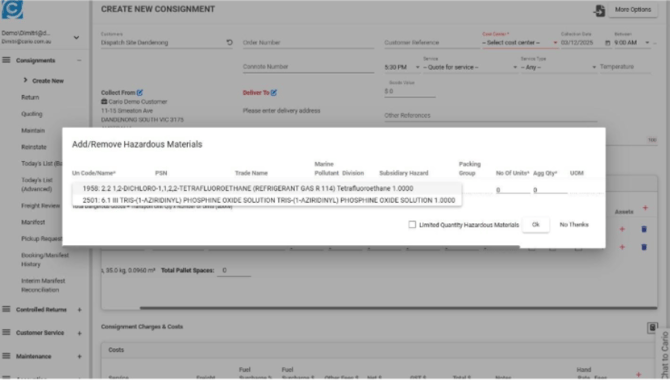
- Select the required Hazardous Material from the list.
- Click OK to apply it to the shipment.
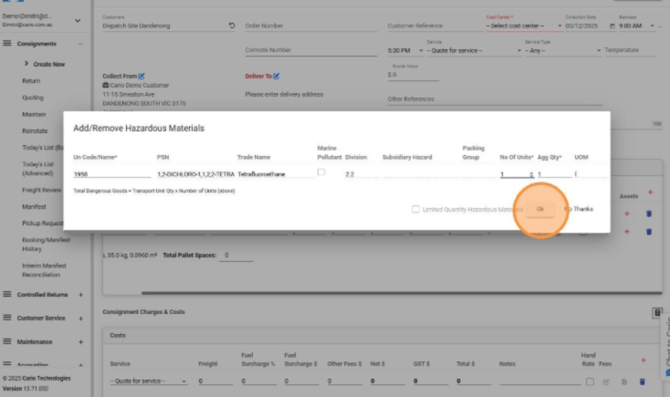
The Dangerous Goods information will now be associated with the container line. 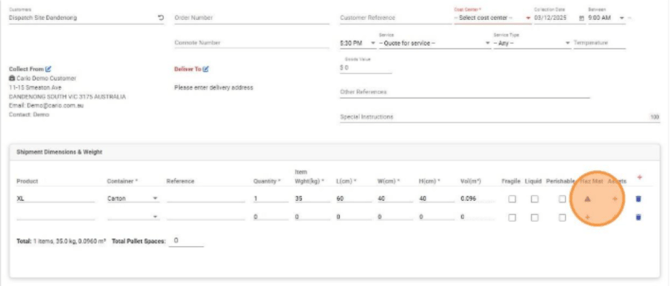
Important Notes
- Hazardous Materials must be created before they can be used in consignments.
- Only carrier services that support Dangerous Goods will be available for DG consignments.
- If a carrier does not support DGs, the consignment must be recreated using a compatible service.
- Dangerous Goods details are critical for compliance, safety, and accurate carrier processing.