![Cario logo RGB blue-1.png]](https://knowledge.cario.com.au/hs-fs/hubfs/Cario%20logo%20RGB%20blue-1.png?height=50&name=Cario%20logo%20RGB%20blue-1.png)
Assets in Cario
Overview
Assets in Cario represent any returnable or trackable physical item that is linked to a consignment. These assets can include pallets, tracking devices, crates, cages, equipment, or any other item that needs to be logged, tracked, or returned after delivery.
The Asset Management feature helps ensure full traceability, accurate return workflows, and accountability for reusable items.
Asset Types
Cario supports multiple asset classes. Common examples include:
- Pallet Assets
Reusable pallets such as:
- CHEP
- LOSCAM
- Plain/Standard
- Customer-owned pallets
Used for tracking the movement and return of pallets assigned to freight.
- Tracker Assets
GPS or RFID-based devices used to monitor shipments.
Examples include:- Tile trackers
- Bluetooth/GPS trackers
- Custom tracking devices
These assets can be returned or disposed of depending on workflow.
- Custom Assets
Some customers may use additional returnable items such as:
- Trolleys
- Bins
- Storage crates
- Dunnage
These can be added using the same asset creation process.
Why Use Assets in Cario?
✔ Accurate Tracking
All assets assigned to a consignment are recorded with unique identifiers.
✔ Return Management
Assets can be flagged for:
- Return – item must be collected after delivery
- Dispose – item is not required back
✔ Customer Accountability
Creates clear audit trails for:
- Missing pallets
- Lost tracking devices
- Discrepancies in reusable equipment
✔ Operational Efficiency
Reduces manual tracking and ensures visibility across carriers, warehouses, and customers.
Where to Manage Assets
Assets are created and managed under:
Maintenance → Assets 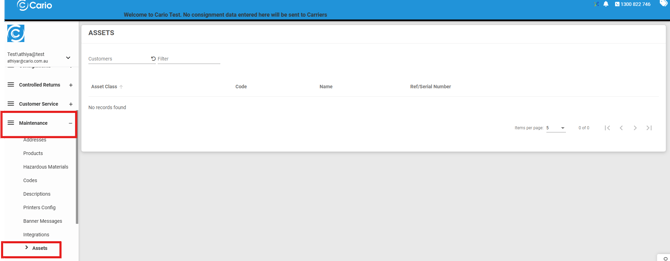
From here, users can:
- View existing assets
- Filter by customer
- Add new assets
- Edit or update asset details
- Review asset reference numbers
Assigning Assets to a Consignment
Assets can be linked to any consignment during creation.
Steps (Summary)
- Create the consignment
- In the Assets section, click ( + )
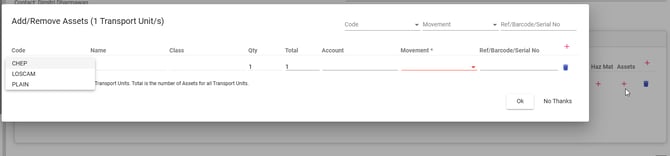
- Select the asset by Code or Model
- Choose Dehire, Exchange, or Transfer
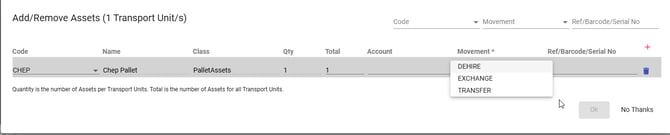
- Confirm and save
Once added, the asset will appear under that consignment with full movement details recorded.
Asset Reference Numbers
Each asset includes a Reference Number, which acts as a unique identifier.
Examples:
- Serial numbers
- Barcode IDs
- Tracker IDs
- Pallet tag numbers
These ensure accurate matching between physical assets and system records.
Asset Movement Types
Movement options determine what must happen to the asset after delivery:
|
Movement Type |
Meaning |
|
Dehire |
Used when assets (e.g. CHEP pallets) are returned to the hire provider or removed from your responsibility. This records the asset as no longer being held or managed by your organisation. |
|
Exchange |
Used when assets are swapped one-for-one with another party, typically at delivery or pickup. This records that an equal quantity of assets was exchanged rather than hired or returned. |
|
Transfer |
Used when assets are moved between locations, accounts, or parties without being returned to the hire provider. Ownership or responsibility is reassigned internally or to another party. |
Reporting & Visibility
Asset usage is visible across:
- Consignment details
- Customer history
- Movement logs
- Operational reporting
This provides transparency and helps businesses monitor reusable asset cycling.
Best Practices
- Always ensure asset details (Code, Name, Reference) match the physical label
- For pallets and trackers, verify the correct movement type (Return vs Dispose)
- Keep asset lists up to date
- Use unique identifiers for every physical unit
- Review asset usage for any discrepancies