![Cario logo RGB blue-1.png]](https://knowledge.cario.com.au/hs-fs/hubfs/Cario%20logo%20RGB%20blue-1.png?height=50&name=Cario%20logo%20RGB%20blue-1.png)
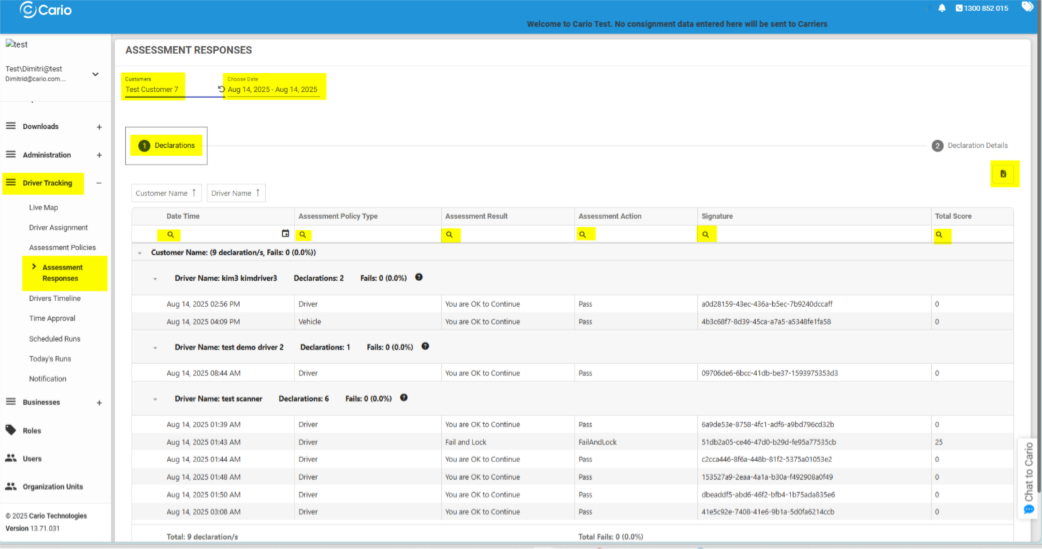
The Assessment Responses screen in Cario Connect TMS allows administrators and supervisors to review, filter, and export driver and vehicle assessment submissions. This provides visibility into driver declarations, pass/fail outcomes, and compliance history across selected customers and time periods.
How to View Assessment Responses in Cario
1. Navigation
- Navigate to Driver Tracking > Assessment Responses from the left-hand menu.
2. Filtering Assessment Responses
Customer and Date Selection
- Select the Customer (e.g. Test Customer 7).
- Choose the Date Range for the assessment responses you want to review.
This will load all assessment submissions that match the selected criteria.
3. Advanced Search & Filters
Use the 🔍 Search icons in the header row to further filter assessment results by:- Date / Time
- Assessment Policy Type
(e.g. Driver Assessment, Load Assessment, Vehicle Assessment)
- Assessment Result
(e.g. “You are OK to Continue”)
- Assessment Action
(e.g. Pass, Fail, Fail and Lock)
- Signature
- Total Score
These filters allow you to quickly locate specific responses or review compliance trends.
4. Understanding Assessment Results
Assessment data is grouped by Driver and displays:- Number of Declarations submitted
- Pass / Fail status
- Assessment Details, including:
- Policy Type
- Result message
- Outcome action (e.g. lockout, allow continuation)
This view helps supervisors identify patterns, failed assessments, or drivers requiring follow-up.
5. Exporting Assessment Responses
-
To export the assessment data:
-
Click the 📁 Folder icon in the top-right corner of the screen.
-
All visible results will be exported to a CSV file.
-
This is useful for:
- Compliance reporting
- Audits
- Offline analysis
- Sharing data with external stakeholders
Related Articles
- Cario Connect TMS: Assessment Policies
- Cario Connect TMS: Drivers and Vehicles
- Cario Connect TMS: Driver Assignment
- Cario Connect TMS: Live Map – Driver Tracking
- Cario Connect TMS: In-App Notifications