![Cario logo RGB blue-1.png]](https://knowledge.cario.com.au/hs-fs/hubfs/Cario%20logo%20RGB%20blue-1.png?height=50&name=Cario%20logo%20RGB%20blue-1.png)
Assessment Policies in Cario Connect TMS allow administrators to control mandatory driver and vehicle safety checks. These policies ensure drivers are fit to operate, vehicles are safe, and operational rules are enforced before drivers can begin work or start a run.
How to Manage Assessment Policies in Cario
Navigation
- Navigate to Driver Tracking > Assessment Policies from the left-hand menu.
- Use the Customer dropdown to select the relevant customer (e.g. Test Customer 7).
- Click Refresh to load the assessment policies for the selected customer.
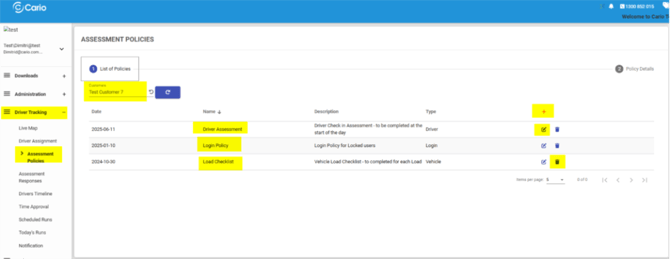
You will see a list of existing policies showing:
- Policy Name
- Description
- Policy Type
Types of Assessment Policies
Cario Connect supports multiple assessment policy types, each triggered at different stages of the driver workflow.
- Driver Assessment
Purpose
- Acts as a fit-to-drive questionnaire.
- Ensures the driver is safe and ready to start the day.
Trigger
- Triggered once per day, at the driver’s first login.
Key Capabilities
- Create custom questions.
- Define question types (Yes/No, checklist, etc.).
- Control pass/fail outcomes based on responses.
- Determine what happens if a driver fails the assessment.
- Load Assessment (Load Checklist)
Purpose
- Ensures the vehicle and load are safe before transport.
Trigger
- Triggered every time a run is started.
- A driver may complete multiple load assessments per day, depending on how many runs are assigned.
Key Capabilities
- Validate vehicle condition.
- Confirm load security.
- Capture safety confirmations before the run begins.
- Policy Rules (Login Policy & Mandatory Assessment Configuration)
Policy Rules define what happens when an assessment is passed or failed.
Examples
- Lock the driver out of the app if an assessment fails.
- Trigger escalation workflows.
- Display mandatory assessments before the driver can proceed.
Escalation
- You can assign a Supervisor contact for escalation support if a driver fails an assessment.
Policy Types You Can Configure
- Driver Assessment Policy
- Defines pass/fail rules for daily driver fitness checks.
- Vehicle / Load Assessment Policy
- Defines pass/fail rules for vehicle and load readiness.
- Login Policy
- Controls the outcome of failed assessments (e.g. lockout, alerts).
- Mandatory Assessment
- Defines that the assessment must appear first on app login.
Action Icons
The following actions are available on the Assessment Policies screen:
- ➕ Plus Icon — Create a new assessment policy.
- ✏️ Edit Pencil — Modify an existing policy.
- 🗑️ Trash Bin — Delete a policy that is no longer required.
Related Articles
- Cario Connect TMS: Drivers and Vehicles
- Cario Connect TMS: Live Map – Driver Tracking
- Cario Connect TMS: Driver Assignment
- Cario Connect TMS: In-App Notifications & Messaging