![Cario logo RGB blue-1.png]](https://knowledge.cario.com.au/hs-fs/hubfs/Cario%20logo%20RGB%20blue-1.png?height=50&name=Cario%20logo%20RGB%20blue-1.png)
The Save Quote function in Cario allows users to generate a freight quote and save it for later use without immediately creating a consignment.
This is useful when pricing needs to be reviewed, approved, or shared before booking.
What Saving a Quote Is Used For
Saving a quote allows users to:
- Capture freight pricing without committing to a booking
- Compare options before finalising a shipment
- Reuse quotes for repeat or similar shipments
- Reduce rework when a booking is delayed
Saved quotes can later be retrieved, updated, or converted into a consignment.
How to Save a Quote (Step-by-Step)
- Navigate to
https://(yourdomain).cario.com.au/app - Click Consignments
- Select Quoting
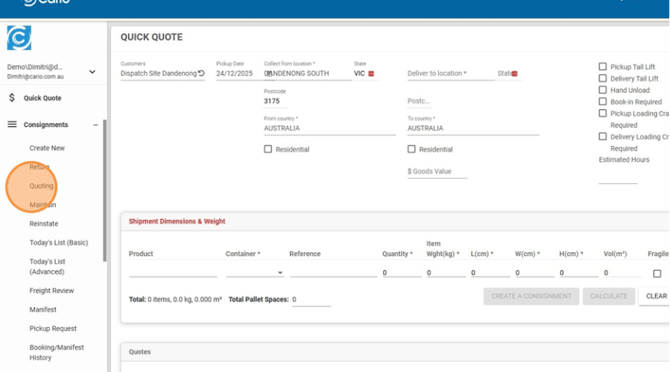
- Enter the Deliver To location
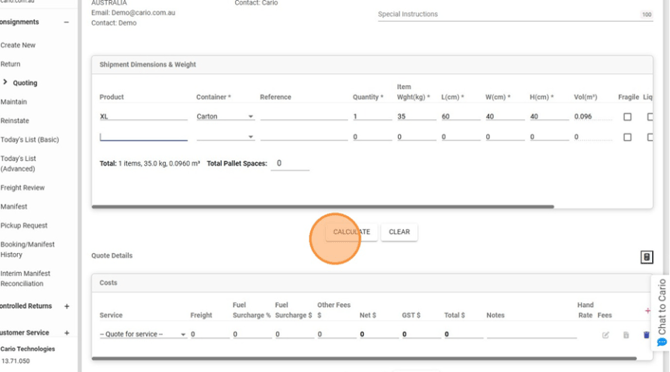
- Enter shipment dimensions and weight
- Click Calculate
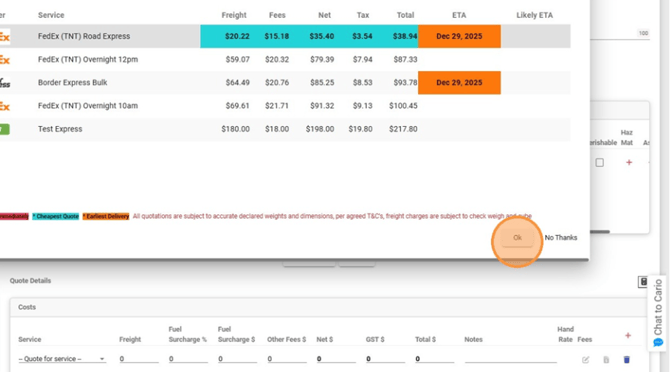
- Select the carrier Service to quote
- Click OK
- Click Save Quote
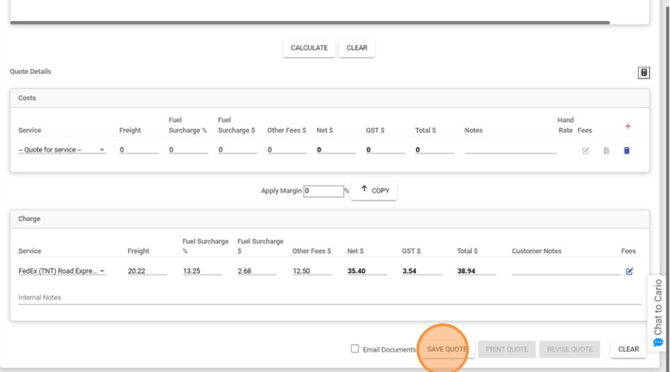
The quote is now stored and available for future retrieval.
What Happens After Saving
Once saved, the quote:
- Retains shipment details and pricing
- Can be retrieved at any time
- Can be revised or converted into a consignment
Saving a quote does not notify carriers or create a booking.