![Cario logo RGB blue-1.png]](https://knowledge.cario.com.au/hs-fs/hubfs/Cario%20logo%20RGB%20blue-1.png?height=50&name=Cario%20logo%20RGB%20blue-1.png)
The Retrieve Quote function allows users to access previously saved quotes and continue working with them.
This enables users to avoid recreating quotes and ensures consistency when proceeding to booking.
What Retrieving a Quote Is Used For
Retrieving a quote allows users to:
- Review previously calculated pricing
- Update shipment details if required
- Print or share quote information
- Proceed directly to creating a consignment
This is particularly useful when quotes require approval or follow-up.
How to Retrieve a Saved Quote (Step-by-Step)
- Navigate to
https://(yourdomain).cario.com.au/ - Click Consignments
- Select Quoting
- Click Retrieve Quote
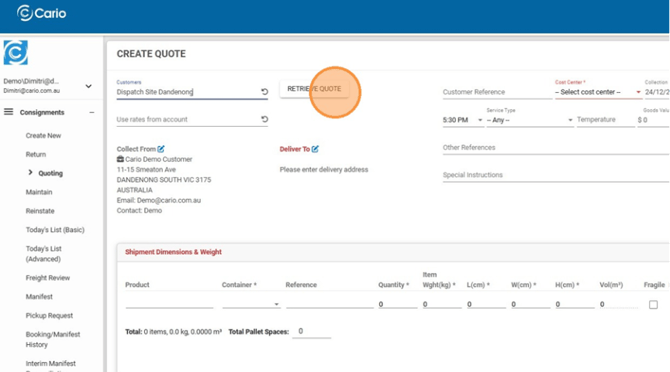
- Select a quote from the available saved quotes list
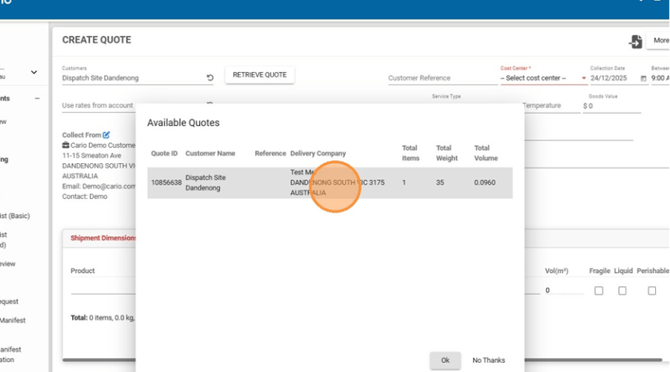
- Click OK
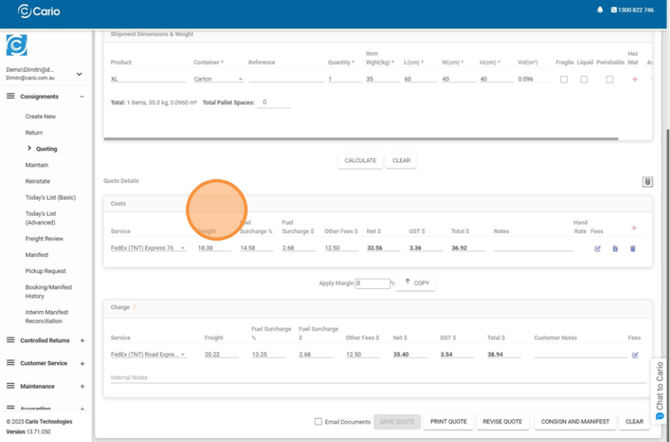
The selected quote will load with all previously saved details.
What You Can Do with a Retrieved Quote
Once retrieved, you can:
- Revise shipment dimensions or locations
- Recalculate pricing
- Print the quote
- Proceed to Create Consignment
Any changes made can be recalculated before booking.
Key Things to Note
- Saved quotes do not expire unless removed
- Pricing may change if carrier rates are updated
- Quotes must be recalculated if shipment details change