![Cario logo RGB blue-1.png]](https://knowledge.cario.com.au/hs-fs/hubfs/Cario%20logo%20RGB%20blue-1.png?height=50&name=Cario%20logo%20RGB%20blue-1.png)
References and Special Instructions in Cario allow users to add structured, reusable information to consignments, improving consistency, accuracy, and speed during booking.
These fields are commonly used for order numbers, pick tickets, delivery notes, and site instructions, and can be preconfigured to reduce repetitive manual entry.
What Are References Used For?
Reference fields (such as Other References or Customer References) are used to store identifying information for a consignment.
Typical use cases include:
- Long order or pick ticket numbers
- ERP or WMS reference IDs
- Customer-specific identifiers
- Internal tracking references
Once configured, these references appear on:
- Consignment screens
- Freight labels
- Consignment documentation
What Are Descriptions & Special Instructions?
Cario supports predefined descriptions that can be reused during consignment creation. These are grouped into three main categories:
- Delivery Instructions
Used for instructions specific to the delivery location (e.g. Call Before Arrival, Leave at Door).
- Pickup Instructions
Used for collection-related requirements (e.g. Call on Arrival, Gate Access Required).
- Special Instructions
Used for general handling or operational notes that apply to the consignment.
These descriptions act as templates, allowing users to quickly select commonly used instructions instead of typing them manually each time.
Why References & Descriptions Matter
Using predefined references and descriptions helps organisations:
- Reduce manual typing and data entry errors
- Maintain consistent instructions across consignments
- Support long or repetitive reference values
- Improve carrier communication and delivery success
- Speed up the consignment creation process
They are especially useful for high-volume environments and repeat delivery scenarios.
How to Add Reference Fields (Account-Level)
Reference fields are configured at the account level using Custom Labels.
- Go to Maintenance
- Select Codes
- Enter and select the relevant Customer
- Select CustomLabels (Custom Field Labels)
- Under Value, select Other References to add a reference field
- Save the changes
To confirm the update:
- Go to Consignments → Create New
- Select the customer
- Enter a value (e.g. a pick ticket number)
- Confirm it appears in the References section
How to Add Delivery, Pickup & Special Instructions
Descriptions are configured using Customer Descriptions.
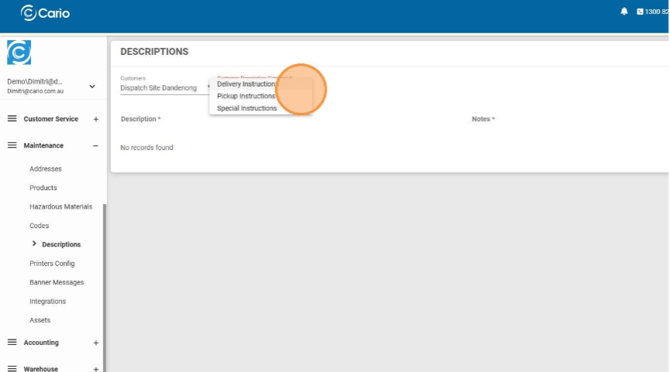
- Navigate to
https://(yourdomain).cario.com.au/app/maintenance/customerdescriptions - Click Maintenance
- Select Descriptions
- Choose Customer Description Category
- Select one of the following:
- Delivery Instructions
- Pickup Instructions
- Special Instructions
- Click on the red Plus Icon to add a new description.
- Enter the description text (e.g. Call Before Arrival, Leave at Door)
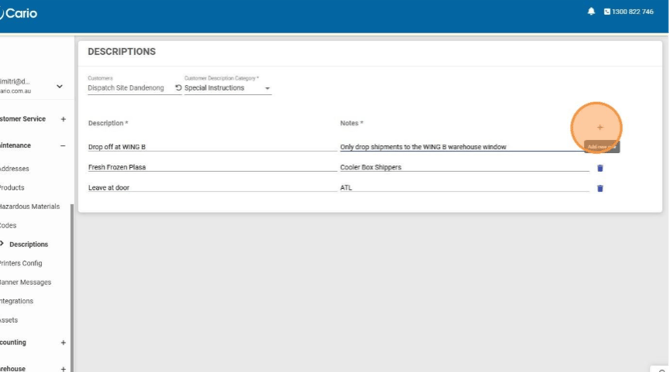
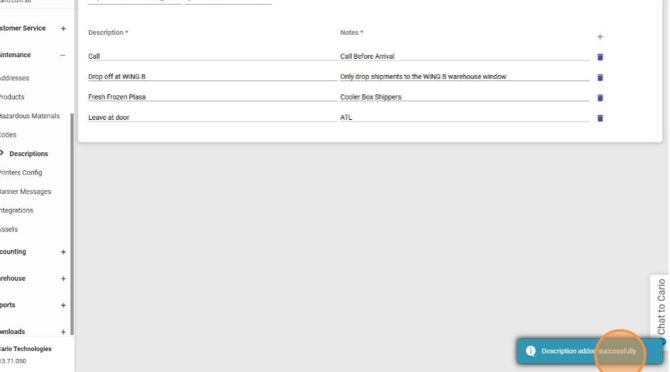
- Save and confirm the Description added successfully message
Using References & Instructions During Consignment Creation
Once configured, references and descriptions are available when creating a consignment:
- Reference fields can be selected or entered in the References section
- Delivery, pickup, and special instructions can be selected from predefined lists
- Multiple instructions can be added quickly without retyping
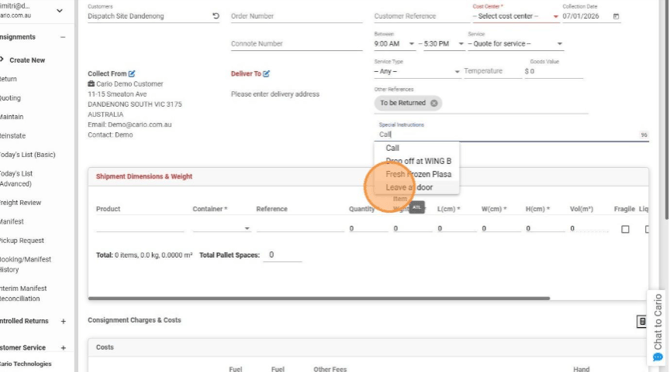
This ensures instructions are consistent, clear, and carrier-ready.