![Cario logo RGB blue-1.png]](https://knowledge.cario.com.au/hs-fs/hubfs/Cario%20logo%20RGB%20blue-1.png?height=50&name=Cario%20logo%20RGB%20blue-1.png)
Purpose
The Drivers & Vehicles module in Cario Connect TMS allows administrators to manage drivers, assign vehicles and trailers, and control how driver activity is tracked and communicated within the system. This setup is essential for ensuring accurate job allocation, real-time visibility, and effective driver supervision. 
What are Drivers & Vehicles used for?
This feature enables you to:
- Create and manage driver profiles within Cario Connect
- Assign drivers at a tenant level or to a specific customer
- Allocate vehicles and trailers to support dispatch and transport operations
- Assign supervisors to drivers for real-time activity notifications
- Provide drivers with secure access to the Cario Connect mobile app
How to Create a Driver, Vehicle, and Trailer
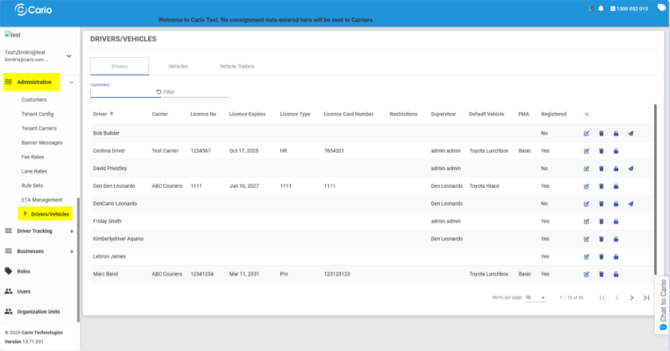
Step 1: Navigate to Drivers & Vehicles
- Go to Administration
- Select Drivers / Vehicles
Step 2: Create a Driver
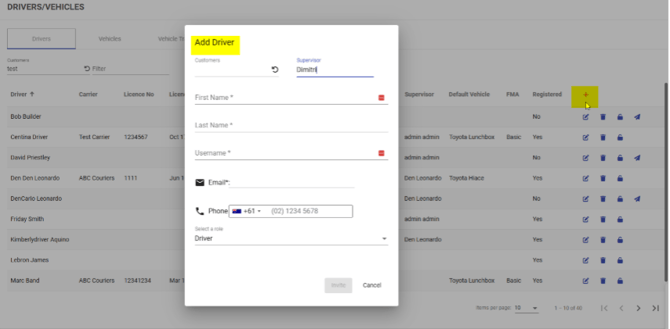
- Click the red “+” (Plus) icon to add a new driver
- Fill in the driver details in the form
Important options when creating a driver:
- Customer field
- Leave this blank to create the driver at the tenant level
- Select a customer to assign the driver to a specific customer account
- Supervisor
- Assigning a supervisor will send driver activity notifications (e.g. job updates, status changes) to that superviso
- Click Invite
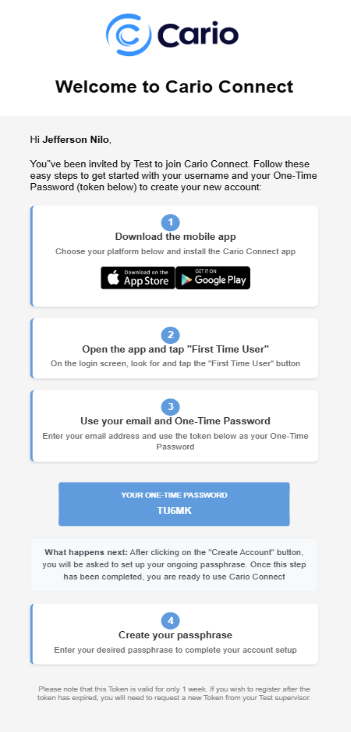
📧 The driver will receive:
-
- An email with their username
-
- A one-time password
-
- A link to download the Cario Connect mobile app
- A link to download the Cario Connect mobile app
Step 3: Add a Vehicle
- Hover over the Vehicles tab
- Click the red “+” (Plus) icon on the right-hand side
- Fill in the required vehicle details
- Click OK to save

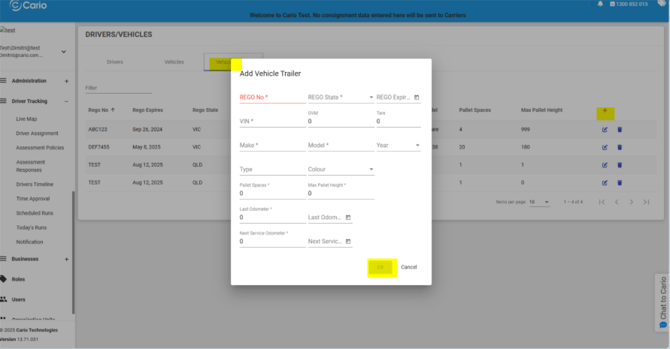
Step 4: Add a Vehicle Trailer
- Hover over the Vehicle Trailer tab
- Click the red “+” (Plus) icon
- Complete the trailer details
- Click OK to save
Helpful Notes
- Drivers can exist independently of customers or be customer-specific
- Supervisor assignment improves visibility and operational control
- Vehicles and trailers can be managed separately for flexible fleet configuration
- Drivers must accept the invite to activate their mobile access