![Cario logo RGB blue-1.png]](https://knowledge.cario.com.au/hs-fs/hubfs/Cario%20logo%20RGB%20blue-1.png?height=50&name=Cario%20logo%20RGB%20blue-1.png)
Overview
The Parent–Child Account structure in Cario provides an organised and scalable way for businesses to manage multiple branches, sites, or business units under a single hierarchy. This structure allows centralised control while enabling localised access where required.
Example Overview (Customer X)
Customer X operates a head office and several branches. In Cario, this structure is represented using Parent and Child Accounts.
Parent Account – Customer X (Head Office)
Customer X's head office is set up as the Parent Account. This account oversees and connects all related branch accounts.
Child Accounts – Customer X Branches
Each branch or location is set up as a separate Child Account, for example:
- Customer X – Branch A
- Customer X – Branch B
- Customer X – Branch C
- Customer X – Branch D
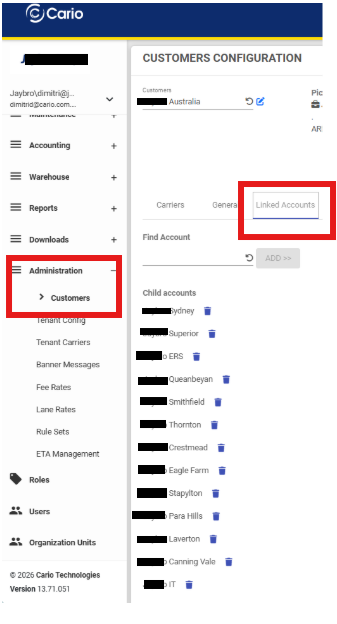
All branch accounts sit under the Parent Account, forming a clear and manageable structure.
How the Parent–Child Relationship Works
Parent Account Access
Users with access to the Parent Account can automatically:
- View and manage all Child Account data
- Access operational information across all branches
- Review consolidated reporting and performance metrics
This is ideal for head office staff, regional managers, or anyone overseeing multiple sites.
Child Account Access
Users assigned to a Child Account only have access to their specific branch.
They will not see other branches unless access is intentionally granted.
This ensures privacy, security, and branch-specific operational focus.
Selective Multi-Branch Access
If a user needs access to several branches but not all, selective access can be provided.
For example, a regional manager may have access to Branch A, Branch B, and Branch C, but not Branch D.
This ensures access is controlled based on operational responsibility.
Adding New Branches
When Customer X expands and opens a new branch (for example, Branch E), it can be added to the system as a new Child Account and linked under the existing Parent Account.
This allows the structure to grow naturally with the business.
Benefits of the Parent–Child Structure
Centralised Management
Parent Accounts can oversee all branches from one location in Cario.
Controlled Access
Branch managers and staff only access what they need, while leadership teams view the full organisation.
Scalable Architecture
New branches or business units can be added easily as the organisation grows.
Improved Reporting
Parent Accounts support combined reporting across multiple branches, improving visibility and decision-making.
Conclusion
The Parent–Child Account structure in Cario is designed for organisations with multiple branches or operational sites. It simplifies management, ensures correct access control, and provides the flexibility needed for both centralised oversight and branch-level independence. Cario’s Onboarding and Support teams can assist with setting up or expanding your Parent–Child configuration when required.