![Cario logo RGB blue-1.png]](https://knowledge.cario.com.au/hs-fs/hubfs/Cario%20logo%20RGB%20blue-1.png?height=50&name=Cario%20logo%20RGB%20blue-1.png)
Overview
In Cario, a Customer represents the organisation, business unit, or site that uses the platform to create consignments, manage freight, and access carrier services. Each customer record contains important information such as addresses, contacts, linked carriers, and key operational preferences.
How Customer Setup Works
When your business first joins Cario, the Cario Onboarding Team will set up and configure your Customer account for you. This includes:
- Creating the Customer profile
- Setting pickup and invoice addresses
- Mapping carriers and rate cards
- Applying required rules and preferences
- Ensuring your workflow aligns with your operational needs
This ensures your system is ready to use from day one.
Managing Customer Settings After Go-Live
Once your account is live, you may occasionally need to review or adjust certain customer settings based on your operations. These settings are available under:
Administration → Customers → General
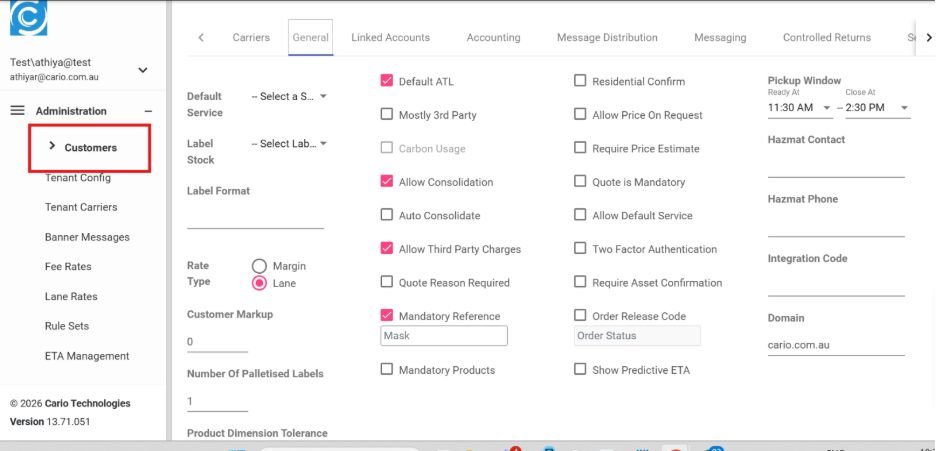
Changes you may manage yourself include:
- Updating contact details
- Enabling or disabling optional features
- Adjusting reference requirements
- Reviewing carrier settings and preferences
If you are unsure about a change or require assistance, the Cario Support Team can guide you.
What the Customer Record Controls
Your Customer profile determines:
- Which carriers and rate cards are available
- What operational rules apply when creating consignments
- How references, labels, and notifications behave
- Any special service or compliance requirements
This ensures each consignment follows the correct process automatically.